3420 Users online, 6.77 mbps
Quick Search
Already a member?
Username:
Password:
Register Here!
New Forum Posts
00:53 by Solaris17
Bad Boys of Case Modding Clubhouse.. (539)
00:49 by newtekie1
Request for GPU-Z (3)
00:48 by spearman914
New PC [Budget under $1100 CAN] (19)
00:47 by freaksavior
[FS/FT][US] Ati HIS 2900GT!!! (7)
00:43 by Shurakai
HIS HD4850 Fan Mod (0)
00:34 by philbrown23
[FS/FT][US] my leftovers (9)
00:32 by freaksavior
Call of Duty 6: Modern Warfare 2 (52)


Last Articles


Popular Articles

Liquid Fusion

« Previous ModReturn to Index Random Mod Next Mod »
Image

More images (click for bigger version):

Thumbnail 1 Thumbnail 2 Thumbnail 3 Thumbnail 4
Thumbnail 5 Thumbnail 6 Thumbnail 7 Thumbnail 8
Thumbnail 9 Thumbnail 10 Thumbnail 11 Thumbnail 12
Owner: BigJunit
Send email
Send private message
Posted: 2007-02-27
Last Update: 2007-07-02 06:33
Viewed: 9110 times
Rating: Superb (7.9)
Voting Graph
8 votes total
Submit vote:
Please register on the forums & login to vote.
Keywords:
High ratedAMDNVIDIACustom caseCustom paint jobWater cooled
This user's other mods:
System Specs:
AMD X2 5200+ @ 3.0Ghz / Nvidia Geforce 8800 GTS OC2 / 2GB OCZ Platimum DDR2 / ASUS Croshair 590 / 160gb Seagate / 400gb Freecom External / Duraband 5.1 Surround Sound / Razor DeathAdder Mouse / 22' HP Widescreen / Custom Watercooling / Custom Temp Monitoring & Fan Control
Performed Mods:
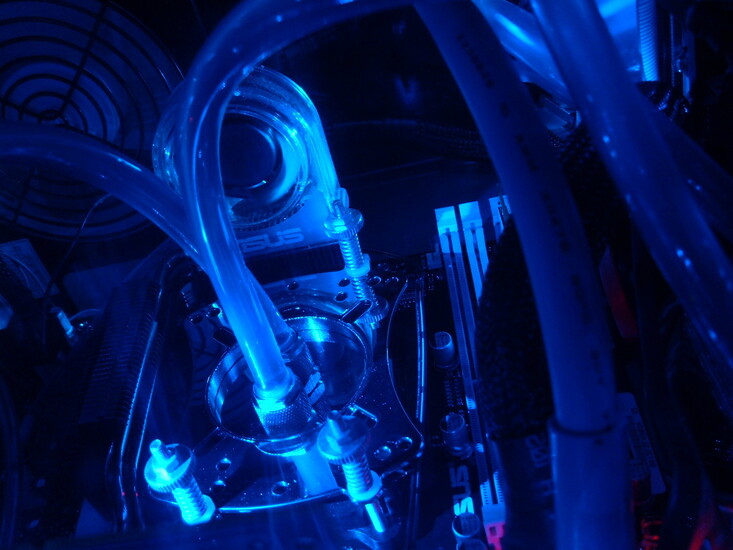
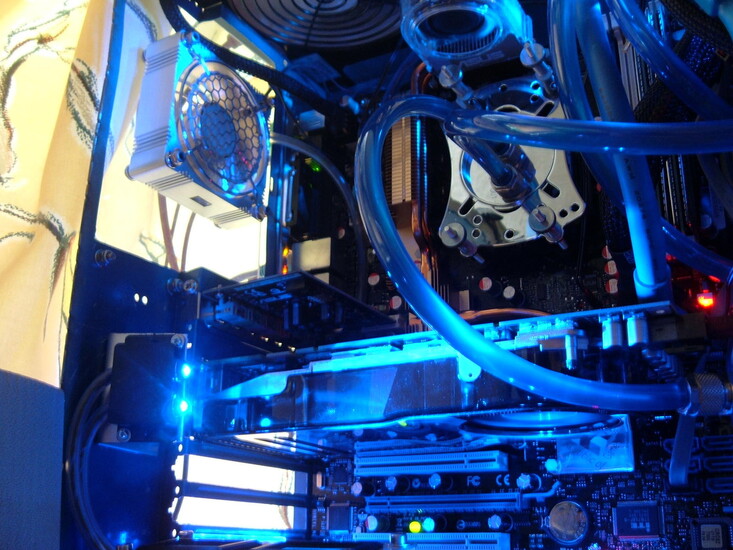
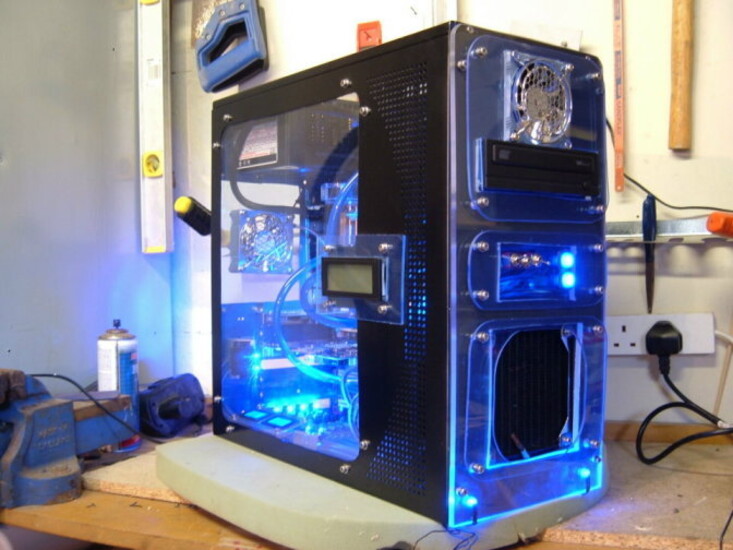
Stripped case / Repainted / Custom Window Top & Side / Custom Front Panel / Watercooling Installed / Custom Led Ligting / LCD Display On Side Panel / Custom Cable Managment
My first watercooled case. Very happy with results and was well worth the 4 months of summer missed out on due to be locked away in the garage. I wanted to build a system with average specs that would never suffer from overheating and be near silent. I only use one 120mm fan on radiator @ 5v and the PSU fan so the system is almost silent and the CPU temp under full load has never exceeded 35'c. So I am very happy Comment positive and negative welcomed , Thanks For Looking

User comments

Post your comment
by Tearathal (February 27th - 7:52 PM) - Reply
Beautiful 10
by dino25 (February 27th - 7:56 PM) - Reply
very,very,nice..now make one for me..:)
by J0N (February 27th - 7:57 PM) - Reply
That is one mean looking case! Looks sweet!
by devinXkillyou (February 27th - 8:23 PM) - Reply
nice build, man. really clean. watercooling is tidy and looks very efficient. good lighting. 9/10
by Alcpone (February 27th - 8:39 PM) - Reply
It looks sweet, did you use tubing for the wiring? Looks like you did, good idea, gets them darn cables out the way and looks nice!
by EviLZeD (February 27th - 9:06 PM) - Reply
looks really good 10/10 =]
by KennyT772 (February 27th - 9:25 PM) - Reply
perfect. 10/10
by Protius (February 28th - 12:47 AM) - Reply
Awesome!
by pt (February 28th - 3:15 AM) - Reply
10/10
looks beautifull
btw, 7600gtx???
by mikey8684 (February 28th - 5:08 AM) - Reply
Very nice and looks kick ass but i think it has too many tubes.
by SK-1 (February 28th - 5:50 AM) - Reply
Nice,...blue always looks trick.9/10
The tubes are part of the whole mod,they work 4 me.
by Towly (February 28th - 6:58 AM) - Reply
10/10 Bru...
Like the sands of the hourglass this the case mods of our lives.
Gr8 job with the plexi glass and water cooling btw.
Tubing mixing with the blue light looks astonishing.
by asphalt (February 28th - 1:34 PM) - Reply
Excellent work! Very impressed with the wire management :)
by BigJunit (February 28th - 8:07 PM) - Reply
Wow thanks for all the positive replys, very much appriciated.

@ Alcpone - the tubing round the wires is actually air hose for fish tanks, it does seem to work well and is just the right size.

@ pt - Yeah my bad, 7600 GT OC
by BigJunit (February 28th - 8:14 PM) - Reply
For anyone interested in the lighting / wiring in the case I have posted a short guide Here

Hope you find it useful
by deodato (February 28th - 9:31 PM) - Reply
Beautiful rig. Just a comment on ur specs, maybe to pimp ur ride a bit. But visually... very impressive =) 9/10
Vote for me @ http://www.techpowerup.com/gallery/571
by BigJunit (February 28th - 11:01 PM) - Reply
yeah specs are a bit of a let down to the system, but are not that important to me.
I enjoy the design and build part of the project and dont use the system for anything special, just a small amount of gaming and downloading.

Perhaps the next one will be alittle higher spec, but not much as I have no need for a high end machine.
by pt (February 28th - 11:54 PM) - Reply
the specs are great in my opinion, but that 7600gtx is a typo right?
by BigJunit (March 1st - 5:53 AM) - Reply
yeah should read NVIDIA BFG GeForce 7600GT OC 256mb

Whe I move eveything to a new case I hope to build shortly I hope to upgrade the CPU to an AMD 64 X2 and hopefuly drop in a Nvidia 8800 320mb (not sure which one yet) That should beef things up abit.

Thats why I brought that motherboard - should be good for about 4 months LOL
by Thermopylae_480 (March 1st - 6:02 AM) - Reply
Very nice.
by DaMulta (March 1st - 6:03 AM) - Reply
by: Thermopylae_480;275978
Very nice.
No NO its BAD ASS!!! 10/10
by Neohazard (March 2nd - 12:20 AM) - Reply
I voted 5/10 because:

man u need to do a cable management and make something diferent :P
by Zak Zilla (March 2nd - 7:43 PM) - Reply
Hey thats a really nice set-up there. i was wondering if u have had any problems with your liquid cooling system. i was thinking about getting one for my camputer. im prettty sure i have the same MOBO as u (ASUS M2N32 SLI Deluxe) or pretty close. because right now my CPU at full load is running about 71-73 degrees which is hot (so i have heard) im just worried about space though (I have a Raidmax RX-9 gaming case) it has a lot of space but i dont know if everything will fit inside it. if you have any suggestions for please e-mail me at saltinekraker2001@yahoo.com
thank you and you have a siiiick comp!
by aximbigfan (March 2nd - 8:20 PM) - Reply
10/10 VERY VERY nice box love the colors!


chris
by FAXA (March 2nd - 10:02 PM) - Reply
Wonderful. Perfect.

Excellent case as well, cables are extremely tidy and the water cooling just edges that score to the big number of 10.


Well done!

10/10
by JUDAS3 (March 4th - 10:56 PM) - Reply
SEX IN A BOX - well done m8.
by Azn Tr14dZ (March 5th - 12:37 AM) - Reply
That looks sick, amazing. The blue theme makes it look very nice.
by KennyT772 (March 5th - 12:41 AM) - Reply
i just noticed that in a majority of your pics the ram isnt in the system. may i ask why?
by BigJunit (March 5th - 1:12 AM) - Reply
@ Kenny - The Ram was the last thing I ordered, got abit tired of waiting for it so took all the pics before it came. In all of the pics excpet the one where the case is positioned on my desk here is no memory in the system and its running off another PSU outside the case on the floor.
by kwchang007 (March 5th - 1:38 AM) - Reply
DUDE that's awsome!!!!!!!!!!!!!!!!!!!!!!!!! i doubt i could ever do that, like half an hour in id just say "screw it" : )
by n-sanity (March 5th - 5:34 PM) - Reply
You split the rails up...? Erm, for....? and why like 8 tubes for the rails... you could've fit all the ground and all the positives in 2 separate tubes, attached those to a terminal and stem everything from there...


IMO, 1 5.25" bay is just stupid, a fan right above it is stupider, and with enough tubings to hang saddam, the airflow gets choked... so i'd say 7/10 for trying... and having decent fabrication skills, but for all that cash and time you could've gotten a real vid card, or if you're not a gamer ( i don't get why you would build such a mad if you weren't ) at least a decent 2 gb of ram, and possibly a dual core cpu.

I honestly hate spiffy rigs with shit inside, when you could've made a rice machine to run laps around that spiffy rig, with a lone cathode inside.

7/10 for trying.
by WarEagleAU (March 5th - 5:45 PM) - Reply
This is truly the mecca of PC building and perfection on display folks. Love the whole thing and Im a huge fan of Blue (absolutely my favorite color out of them all!). Everything looks clean and nice and I wish I Could have had my wiring just as tidy, but I was too in a hurry to get the damn thing put together so my wife and family could do what they had to do. Good job man and I Gave you a 10/10 on the case mod gallery.
by BigJunit (March 5th - 6:44 PM) - Reply
by: n-sanity;280384
You split the rails up...? Erm, for....? and why like 8 tubes for the rails... you could've fit all the ground and all the positives in 2 separate tubes, attached those to a terminal and stem everything from there...

IMO, 1 5.25" bay is just stupid, a fan right above it is stupider, and with enough tubings to hang saddam, the airflow gets choked... so i'd say 7/10 for trying... and having decent fabrication skills, but for all that cash and time you could've gotten a real vid card, or if you're not a gamer ( i don't get why you would build such a mad if you weren't ) at least a decent 2 gb of ram, and possibly a dual core cpu.

I honestly hate spiffy rigs with shit inside, when you could've made a rice machine to run laps around that spiffy rig, with a lone cathode inside.

7/10 for trying.

Thats all very true, but I am not a serious gamer and I am not interested in a PC that has more power than I actually need. The system is used for downloading, nothing much more.

The reason it was designed and built in such a way that the cables look way OTT is because thats how I wanted it to LOOK. Performance and spec means nothing to me, I enjoy the design / build. Once I have finished building a system I plan the next one and the strip it down and start again. That case will be in a skip with a month.

Also you mention the tubes having an adverse effect on airflow. Not true, 2 x 80mm @ 5v and 1 x 120mm @ 5v gives a CPU temp of around 18 - 20'c, Case temp of 20 - 23'c, and HDD 28 - 30'c, thats under full load - you can take 5-6'c off all of those temps at idle.

I would love to know why one 5.25' bay is stupid when you only have and only need one component that fits into a 5.25' bay, surely having 2 - 3 bays when you only need one is stupid.

The fan removes the dead spot most people have at the top of their cases where hot ait will acumulate (granted not enough to make a huge difference).

Basically a difference of opinion as I can think of nothing worse and less for-filling than just spending alot of cash on parts and just bolting them together, wheres the uniqueness in that?

Thanks for the comments though - but it looks as though we both own PCs for the complete opposite reasons.
by n-sanity (March 5th - 7:26 PM) - Reply
Oh its n exhaust fan?

Anyhow, upgradeability to 2 devices is ALWAYS a plus :)

Also, i see u enjoy the build, so i take back like half of that.

On the last note, you do realise that your house temp would have to be 12c for what you said to be true right...? Unless you have a tec in the loop which i dont see or using evap cooling, you can't physically go below ambient.
by KennyT772 (March 5th - 7:32 PM) - Reply
54 degrees F? i highly doubt that. 20c-25c is general room temp. unless your temp sensors are off or you live in a house that cold its a lie.
by BigJunit (March 5th - 7:34 PM) - Reply
Not an exhaust fan as such no - just keeps the air in the top half of the case moving.

The closest reading to a house temp I can get is the sensor in front of the radiator - reads 19.3'c at the mo

CPU - reading 19'c
Mobo - 29'c
Case - 21'c
HDD - 32'c

They are high compared to normal (just been encoding a few dvd's mine)

There will obviously be a margin for error with the temp sensors on the CPU,MOBO,HDD but the stand alone units inside the case dont lie. It does help things having the case right next to a window though! :)

But I swear to you now they are the readings I am getting.

Lowest CPU temp reading I have ever had was 8'c Idle - but thats watercooled and water is alot easier to cool than air.
by BigJunit (March 5th - 7:35 PM) - Reply
Recommend me the most acurate temp measuring program and I will do a screen print of the temps if you wish.
by KennyT772 (March 5th - 7:37 PM) - Reply
by: BigJunit;280466
Not an exhaust fan as such no - just keeps the air in the top half of the case moving.

The closest reading to a house temp I can get is the sensor in front of the radiator - reads 19.3'c at the mo

CPU - reading 19'c
Mobo - 29'c
Case - 21'c
HDD - 32'c

They are high compared to normal (just been encoding a few dvd's mine)

There will obviously be a margin for error with the temp sensors on the CPU,MOBO,HDD but the stand alone units inside the case dont lie. It does help things having the case right next to a window though! :)

But I swear to you now they are the readings I am getting.

Lowest CPU temp reading I have ever had was 8'c Idle - but thats watercooled and water is alot easier to cool than air.
46.6 degrees F? your sensors are definatly off, or you have the radiator outside of the window in the snow or something. what is your house thermostat set at?
by BigJunit (March 5th - 7:39 PM) - Reply
Very rarley have the heating on to be honest - its not on now. LOL radiator out the window is the next mod
by KennyT772 (March 5th - 7:44 PM) - Reply
a couple of weeks ago i was trying to max overclock my system...it was 5 degrees F outside and i had both windows open with big fans blowing the air around. my cpu load was 6c at 1.575v!!! i had my x1800xt at 750/925 too.
by BigJunit (March 5th - 7:48 PM) - Reply
I will admit the temps I am quoting seem very low but thats what my twmp monitoring system (ASUS PCProbe II) and also Speedfan are quoting.

It is quite cold where the system is sat, next to a single glazed window 5 floors up on the coast in sunny England.

Even if all the readings were all 10-15% out, thats still quite chilly for an AMD 64 3500+ @ 2805mhz 255*11 @ 1.52v.
by KennyT772 (March 5th - 8:07 PM) - Reply
well asus motherboards + pcprobe are known to be off more times than not. the hard disk temp is the only one that sounds correct for those. either way its still a cool running comp and its quiet..what else matters?
by n-sanity (March 5th - 9:47 PM) - Reply
by: KennyT772;280483
well asus motherboards + pcprobe are known to be off more times than not. the hard disk temp is the only one that sounds correct for those. either way its still a cool running comp and its quiet..what else matters?
Wow definitly quote that. Lol buddy, your cpu isnt at 19c. Its not far off though, so kudos on that. The water is installed fine ;)

As for real temps, i advise getting a thermal probe in your loop, cause if you ever decide to OC, ACCURATE results matter.

Lastly... a fan... blowing IN ... up there... its just not needed. If it was exhaust i'd understand, but blowing cold in front the top wouldn't do anything because the hot air on top of the case doesnt damage any components. It wouldn't look half bad if there were 2 fans side by side exhausting, that would raise the performance too, but the single one just looks like a cyclops 0-) ... Just my 2 bits though.
by n-sanity (March 5th - 9:48 PM) - Reply
Lol ooooh i can see why you're so warm in the second last picture !!!
by BigJunit (March 6th - 5:47 AM) - Reply
by: n-sanity;280547
Lol ooooh i can see why you're so warm in the second last picture !!!
lol - the odd drop or two does help
by FanATIc (March 6th - 4:22 PM) - Reply
Professional, VERY professional :P
10/10
by pentastar111 (March 9th - 4:04 AM) - Reply
So much tubing it looks like it's living, you built a cylon. lol. 10/10 from me
by BigJunit (March 12th - 1:58 PM) - Reply
Thanks to everyone who has voted and made comments - All are much appriciated

Cheers
by BigJunit (March 22nd - 7:31 PM) - Reply
I have upgraded the main hardware in this system for better gaming performance, and also in anticipation of the new DX10 games that are fast approaching.

** SEE NEW PICTURES IN GALLERY **

New Hardware:

AMD Athlon 64 X2 Dual Core 5200+ 2.60GHz (Socket AM2) @ 3.0Ghz
OCZ 2GB (2 x 1GB) PC2-6400 Dual Channel Platinum Revision 2 XTC Series DDR2
BFG GeForce 8800 GTS OC2 320MB GDDR3 HDTV/Dual DVI (PCI-Express)

I havent overclocked very high yet but already a huge difference in just about every program / game I have run.

Best way to show this is with the graph below, 3Dmark06 - New v's Old
This was run with everything at stock speeds except the CPU overclocked to 3.0Ghz for both new and old.

Very happy with the results, but theres alot more to be squeezed out yet. Let me know what you think, cheers.

by LiNKiN (March 22nd - 10:06 PM) - Reply
Awe-Inspiring, truly a work of Art my friend. 10
by TheCrow (March 22nd - 11:09 PM) - Reply
Looks ace to me mate!

I also got slated for having a shit? video card, but its whatever works for you!

Top Marks!
by BigJunit (March 23rd - 10:06 AM) - Reply
I got abit fed up of not being able to run BF2142 on full settings, also I 'NEED' to own crysis when it comes out so the 8800 became a must lol, PM sent Re: CPU Speed
by acousticlemur (March 24th - 7:46 AM) - Reply
looks great def give ya a 10. lookin at the first pic though, is your memory in the dual chanel slots????
by BigJunit (March 24th - 10:03 AM) - Reply
according the the motherboard manual they are but i am not so sure - what would be the best way to check for sure?

thanks for the comment
by acousticlemur (March 24th - 4:52 PM) - Reply
i always thought that the colors were how to specify which was which. in my case, both asus boards, blue is the dual channel.

This is my current MOBO not nearly as sexy as yours!! but hey, it works! i have my DDR in the blue slots as they are the Dual Channel.


This is my old A7N8X Deluxe, and the Blue are also the Dual Channel.


i would assume that being that your board is also asus that the 2 blue ones are your dual channel.
by acousticlemur (March 24th - 4:53 PM) - Reply
sorry for the wicked huge pics, but i just formatted both of my partitions vista, and xp and i have no photo editing progs installed yet :D
by BigJunit (March 24th - 6:45 PM) - Reply
that was my understanding too, re: the colours

CPU-Z shows memory as dual when they are in the first 2 slots as shown in the pictures, but out of curiosity i switched them to be in each of the blue channels and CPU-Z also shows memory type as dual. Strange

So I have left them in the blue slots now, have noticed no performance increase though. But hey they look nicer now lol

Thanks for the help, much appreciated
by acousticlemur (March 24th - 6:47 PM) - Reply
no problem :D
by Squirrel-666 (June 4th - 1:08 PM) - Reply
Nice craftmanship dude did some gd work on he comment on mine aswell dude wen u get bk from ur hols lol
http://www.techpowerup.com/gallery/834 10/10 m8y fit my watercooling if u want m8 lmao
by erichuizer (June 19th - 10:12 PM) - Reply
very nice ...a 9

vote for me too plz(project geminii part2)
by BigJunit (July 2nd - 12:34 PM) - Reply
Small update to pics and spec after buying new screen and some other bits and bobs, take a look
by demonbrawn (July 2nd - 3:00 PM) - Reply
Amazing... I'm partial to blue so this gets extra props from me.
by Chewy (July 24th - 8:29 PM) - Reply
10/10 unique cool mod and it looks pimp.. cant wait to see what you do with your new project.
by BigJunit (July 24th - 9:18 PM) - Reply
Thanks Chewy, Yeah the new ones coming together nicely ...... im a tad excited lol
by jcmax (December 17th - 5:52 PM) - Reply
looks well cool nice blue theme
by EnergyFX (January 7th - 10:39 PM) - Reply
looks very nice, what kind of waterblock is that on the CPU?