Monday, September 7th 2026

Windows 11 Seems to Be Getting a Battery Widget for the Lock Screen and Widgets Board

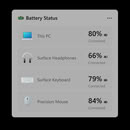
Microsoft appears to be working on a battery status widget for Windows 11 that would show the charge level of your PC alongside any connected wireless accessories in one place. First spotted on Discord, references to the battery status widget were found in recent preview builds, though the feature isn't functional yet. The widget is designed to appear on both the Widgets Board and the lock screen, with light and dark theme variants already present in the build's assets. It would list the PC's own battery at the top, followed by connected peripherals like Bluetooth mice, keyboards, or headphones, each shown with its own icon, name, and battery percentage. It also looks like it will indicate the charging status and whether Energy Saver is enabled for a given device.

It's a fairly obvious addition and, honestly, quite overdue. Android and iOS have offered similar battery overviews for years, so Windows 11 catching up here isn't exactly groundbreaking. The Widgets Board has struggled to find a real purpose since launching in 2021, with only a handful of apps, such as Phone Link, OneDrive, and Weather, making good use of the space. A genuinely helpful system widget like this one might finally give people a reason to open it. Since none of this is live yet, there's no word on when Microsoft plans to ship it, or whether the lock screen version will roll out at the same time as the Widgets Board one.
Source: Windows Central
Add your own comment

18 Comments on Windows 11 Seems to Be Getting a Battery Widget for the Lock Screen and Widgets Board

#1
ymdhis
As I recall even Windows Vista could do this, and Win10 can still do it if you restore the desktop widgets.

But I'm sure this one will require like 10x the resources.
Posted on Reply
#2
theouto
Wait, it didn't already have this?
Posted on Reply
#3
Grimling
Microsoft appears to be working on a battery status widget for Windows 11 that would show the charge level of your PC alongside any connected wireless accessories in one place.
Ahhh, good to know that Microslop is focusing on solving all the huge Problems Windows 11 has!
Posted on Reply
#4
windwhirl
GrimlingAhhh, good to know that Microslop is focusing on solving all the huge Problems Windows 11 has!
People working on UI elements are not the same as the people working in the kernel.
Posted on Reply
#5
Darmok N Jalad
ymdhisAs I recall even Windows Vista could do this, and Win10 can still do it if you restore the desktop widgets.

But I'm sure this one will require like 10x the resources.
WebView2 and its own instance of Edge?
Posted on Reply
#6
Let3r
It’s ridiculous how Windows has removed a bunch of features and is now re adding them and claiming that’s it’s an innovation.
Posted on Reply
#7
Easo
windwhirlPeople working on UI elements are not the same as the people working in the kernel.
It's the same as trying to explain that people coding the games are not the same who draw textures or put stuff on their webpages or etc. etc.
Posted on Reply
#8
Dr. Dro
Hello? Just bring back the Windows Mobility Center? This was solved 20 years ago on Vista!
Posted on Reply
#9
AsRock
TPU addict
EasoIt's the same as trying to explain that people coding the games are not the same who draw textures or put stuff on their webpages or etc. etc.
Yes but they seem so happy with the already done and gone widget, well back again.
Posted on Reply
#10
Hecate91
What's old is new again, but this one will probably be unoptimized and eat RAM.
Posted on Reply
#11
_JP_
Dr. DroHello? Just bring back the Windows Mobility Center? This was solved 20 years ago on Vista!
Thing is, that one had its own keyboard shortcut, right-click call and could, amongst other things, change your power plan so, you know, it was useful.
This one... Has pretty icons?
Posted on Reply
#12
ymdhis
windwhirlPeople working on UI elements are not the same as the people working in the kernel.
Yeah, because nobody is actually working on the latter.
Let3rIt’s ridiculous how Windows has removed a bunch of features and is now re adding them and claiming that’s it’s an innovation.
If it was a car company, they'd be like "Our next car will feature steering wheels and brakes, to greatly reduce the rate of those pesky head-on collisions!".
Posted on Reply
#13
windwhirl
Darmok N JaladWebView2 and its own instance of Edge?
Please don't.
Dr. DroHello? Just bring back the Windows Mobility Center? This was solved 20 years ago on Vista!
I think, somewhere in Windows 11, battery charge for peripherals is still reported, but for the life of me I can't remember where.
Posted on Reply
#14
Dr. Dro
windwhirlI think, somewhere in Windows 11, battery charge for peripherals is still reported, but for the life of me I can't remember where.
Settings app where you see the list of Bluetooth devices. Same for Win10.
Posted on Reply
#15
Pepamami
I hope it eats a lot of cpu power and atleast 1 gig of ram
Posted on Reply
#16
_roman_
More Android like Features will improve the Explorer crashes, teh task bar crashes, the file compression crashes and the DRAM memory footprint, the bootup times, the windows update waiting time, the more than 3 times reboot for a windows update a few hours ago, ....

Keep on focusing on nonsense features. My laptop has physical leds to show me the power state and if it is charging. why do i need or want a software polling function for that. in low power mode or lock screen the device should be in a very low power mode which should not matter how charged anything is.

A battery indicator for USB HID may be nice but i do not use such stuff. and my only battery powered keyboard will not expose the battery state over usb. I got it for free but the usability is very limied for a smaller size battery powered usb keyboard
Posted on Reply
#17
Grimling
windwhirlPeople working on UI elements are not the same as the people working in the kernel.
So u really believe that there are still real people (DEVELOPERS, DEVELOPERS, DEVELOPERS) @ MS doing real Developing things?
I think they are all in retirement, fired or moved on. Now they have some minimum-wage workers prompting AI-Tools.
Posted on Reply
#18
NoneRain
🚨New awesome WebView2 App incoming🚨, with absolutely low ram usage, nos bugs at all and really reliable
Posted on Reply
Add your own comment
Nov 22nd, 2026 22:15 CST change timezone

New Forum Posts

Popular Reviews

TPU on YouTube

Controversial News Posts