Wednesday, November 11th 2026

Radeon Users Get a Stopgap Open-Source Fix for AMD's SSD Write Bug
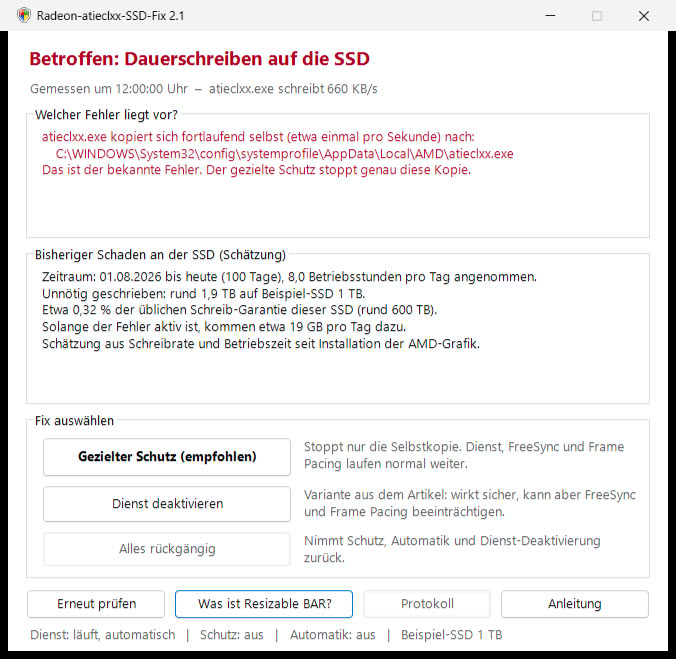
AMD's Radeon SSD write bug now has a community workaround that doesn't require disabling the External Events Utility. ComputerBase forum member Necandi (necanditool on GitHub) has released Radeon-atieclxx-SSD-Fix, a free, open-source tool that blocks the writes but leaves the service running. The developer found that atieclxx.exe keeps copying its own 660 KB executable out of the driver folder and into the Windows SYSTEM profile every second, or roughly 56 GB of writes per day. User reports put the write rate between 0.3 MB/s and 5 MB/s, and the top end works out to a massive 432 GB a day.
The tool uses Windows file permissions to deny the SYSTEM account write access to that one copied file, so each copy attempt fails and nothing new lands on the drive. Since the service stays active, FreeSync, frame pacing, and Radeon hotkeys should keep working. It also checks whether a PC is affected first, estimates the writes so far, and adds a scheduled task that reapplies the block after driver updates. Apparently, it can even lift the protection on its own once AMD patches the bug. The interface is only in German for now, and it is an unofficial tool, so readers are advised to use it at their own risk.
 AMD has confirmed the bug, with a fix planned for Adrenalin 26.11.1, though that driver isn't out yet. Meanwhile, the other workarounds are disabling the External Events Utility, which may affect FreeSync and frame pacing, or turning off Resizable BAR in the BIOS, which can cost some gaming performance.
Sources:
Radeon-atieclxx-SSD-Fix (GitHub), ComputerBase
The tool uses Windows file permissions to deny the SYSTEM account write access to that one copied file, so each copy attempt fails and nothing new lands on the drive. Since the service stays active, FreeSync, frame pacing, and Radeon hotkeys should keep working. It also checks whether a PC is affected first, estimates the writes so far, and adds a scheduled task that reapplies the block after driver updates. Apparently, it can even lift the protection on its own once AMD patches the bug. The interface is only in German for now, and it is an unofficial tool, so readers are advised to use it at their own risk.

7 Comments on Radeon Users Get a Stopgap Open-Source Fix for AMD's SSD Write Bug
I think it was because I was really annoyed Radeon Hotkeys overrode some keyboard shortcuts I actually use.
Disabling the service is not an option here as it breaks VRR and Freesync
Before
After
And the workaround I did is the best one and easiest took me 1 min.