Saturday, November 28th 2026

GIGABYTE RGB Effects Caught Causing Stutter, Team Allegedly Fired
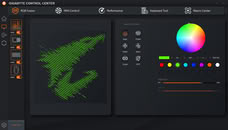
Gamers who dislike RGB lighting will probably love this one. GIGABYTE's RGB software was traced to be the reason behind a user's stuttering issues. Bilibili creator 51972 reportedly got a message from a viewer whose GIGABYTE flagship build, featuring a Ryzen 7 9800X3D, stuttered in every game they played. First, the viewer blamed the 9800X3D, but the creator found a different cause. The 51972 team rebuilt an identical system, ran a copy of the viewer's drive on it, and spent nearly a month chasing the problem. Then came the breakthrough: the frame time spikes were landing in sync with the RGB animation on the GIGABYTE GeForce graphics card. That model also had a built-in screen, which probably didn't help matters.
The system apparently started showing issues with GIGABYTE Control Center (GCC) after a recent NVIDIA driver update. Specifically, it took longer to push lighting commands to the card's onboard controller, and any delay there turned into a stutter in-game. A GIGABYTE representative in China reportedly told 51972 that the company had already fired the entire GCC development team over complaints about the software. This hasn't been officially confirmed by GIGABYTE yet, but it's quite interesting if true. Until GIGABYTE issues an official update to its Control Center fixing this bug, users are advised to turn off their lighting effects or switch to a static mode instead.
Sources:
Bilibili, TudoCelular, via Wccftech
The system apparently started showing issues with GIGABYTE Control Center (GCC) after a recent NVIDIA driver update. Specifically, it took longer to push lighting commands to the card's onboard controller, and any delay there turned into a stutter in-game. A GIGABYTE representative in China reportedly told 51972 that the company had already fired the entire GCC development team over complaints about the software. This hasn't been officially confirmed by GIGABYTE yet, but it's quite interesting if true. Until GIGABYTE issues an official update to its Control Center fixing this bug, users are advised to turn off their lighting effects or switch to a static mode instead.

8 Comments on GIGABYTE RGB Effects Caught Causing Stutter, Team Allegedly Fired
Only decent implementation is over USB where all patterns are uploaded to the MCU and it then runs the show (basically just like WLED does for ARGB strips) and only small updates are sent, but many vendors can still botch that.
And then there's the overhead of getting the data, things like temperatures, fan speeds to update the lights. Often done by running "fat" sensors library similar to HWINFO in the background, no matter what sensors you actually need.
If you are after pure performance, avoid the RGB plague...
Straight up firing the entire team is ridiculous, but I guess they were on thin ice already or other reasons.